
How to Upgrade Network Cabling Without Disrupting Your Daily Operations
Key Takeaways:
- Slow file transfers, WiFi dead zones, dropped VoIP calls, and recurring support tickets may indicate that outdated cabling has become a network bottleneck.
- A detailed site audit should document cable runs, telecom rooms, pathways, power availability, rack capacity, and potential code or safety concerns.
- Structured cabling with standardized, clearly labelled connections simplifies troubleshooting, maintenance, and future expansion.
- Upgrade schedules should reflect real operating patterns, such as evenings for offices, low-volume shifts for call centres, and maintenance windows for manufacturing facilities.
- Phased and parallel installations allow new cabling to be installed and tested while the existing network remains operational.
- Cat6 or Cat6A can support many modern workplace devices, while fiber is well suited to backbone connections between floors, closets, and larger facilities.
- Pre-cutover testing, redundant connections, clear staff communication, and a documented rollback plan help contain disruptions if problems arise.
A dropped VoIP call during a client meeting, a security camera that keeps buffering, a WiFi access point that can’t keep up with a growing team. These moments are usually the first sign that the infrastructure running in the background, quietly behind the walls and ceiling tiles, needs more than a patch job. Upgrading structured cabling doesn’t have to mean shutting down operations for a week. Done strategically, your business can modernize its network backbone while phones keep ringing, cameras keep recording, and your team keeps working.
Recognizing the Need for an Upgrade
Slow file transfers, WiFi dead zones, and intermittent dropouts on VoIP calls are common early indicators of cabling infrastructure issues. So is a network that technically works but can’t support new demands like a security system with more cameras, or a shift to cloud-based applications that require more sustained bandwidth than the current setup was built for. Other signs include:
- Your IT team spends more time troubleshooting connectivity than anything else
- Repeated support tickets tied to the same closets or floors
- Frequent outages
These are all red flags that the cabling itself, not the devices plugged into it, is the bottleneck.
Age & Growth Matter Too
Cabling installed 10 or 15 years ago was likely designed around a much smaller device count and lower data speeds. Cat5e, for example, was never built to comfortably support the Power over Ethernet (PoE) loads that modern access points, cameras, and IP phones now draw.
However, the clearest signal is usually growth. Adding staff, opening a new area of the office, or introducing new departments almost always exposes a network that was sized for a smaller operation. Recognizing this early, before failures become disruptive, gives you room to plan an upgrade on the best timeline instead of reacting to disruptions.
Structured vs. Unstructured Cabling Systems
Structured cabling follows a standardized design, typically aligned with ANSI/TIA-568 guidelines, organized into clearly labelled runs that connect back to a central patch panel or distribution frame. Every cable has a defined purpose, path, and endpoint, which makes the system easy to document, troubleshoot, and expand.
Unstructured cabling, by contrast, tends to grow organically over time. A cable gets run when a new device needs one, with little regard to long-term organization. It works in the short term but becomes harder to manage with every addition.
Troubleshooting & Future-Proofing
The delta becomes obvious the moment something goes wrong. In a structured system, a technician can isolate a fault to a specific run in minutes. In an unstructured one, tracing a single cable through a tangle of unlabelled runs can take hours, and the risk of accidentally disconnecting something unrelated goes up considerably.
The differences between the two systems also matter for upgrade planning. A business that already has structured cabling but has outgrown its capacity has an easier path: individual runs, panels, or closets can often be upgraded in isolation without touching the rest of the system.
Planning and Communication
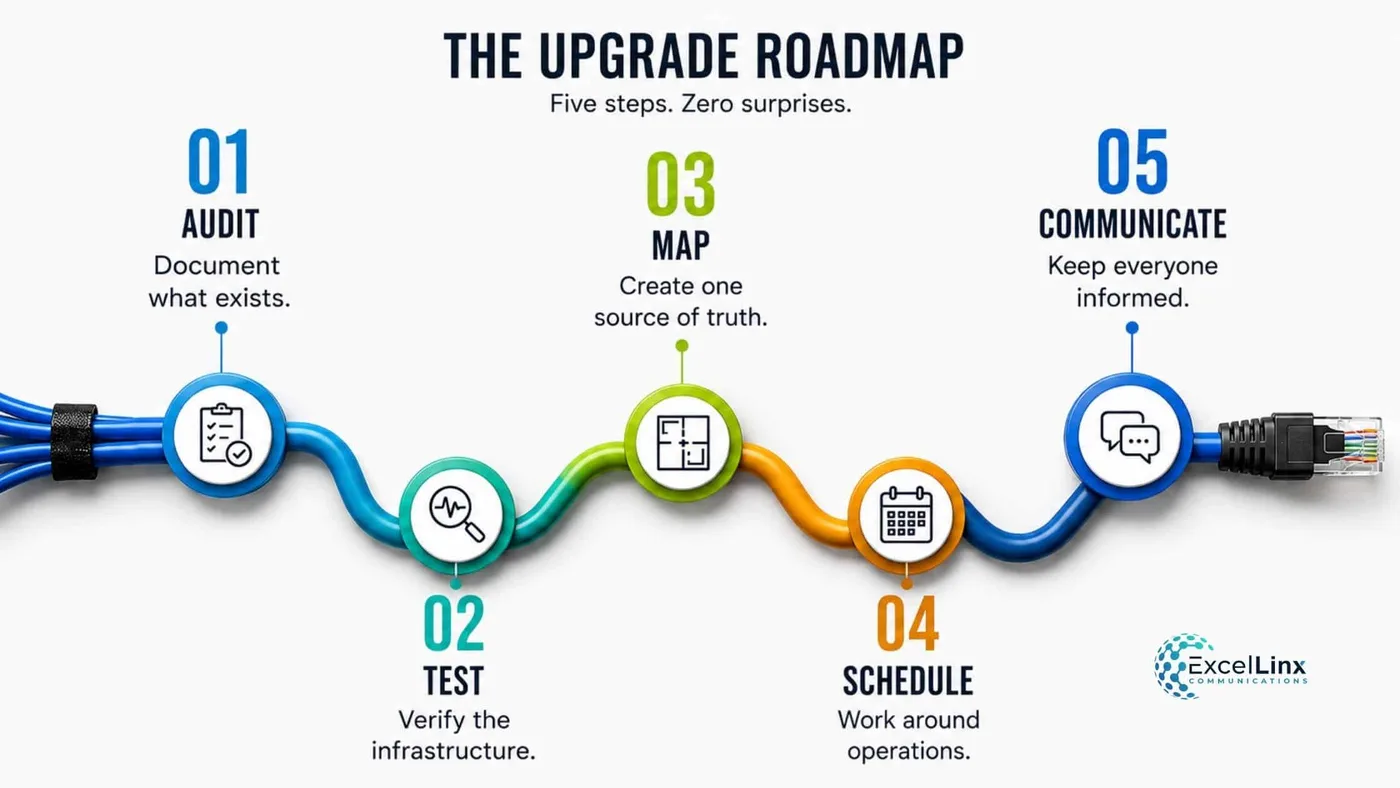
A cabling upgrade succeeds or fails based on what happens before any cable gets pulled. Two things need to happen in parallel: a technical audit that maps exactly what exists and what needs to change, and a communication plan that keeps the rest of the business informed enough that the work barely registers as an inconvenience.
Step 1: Conduct a Full Site Audit
Before a proposal, budget, or timeline gets built, someone needs to physically document the current state of the network. Skipping this step is one of the most common reasons upgrade projects run over budget or uncover surprises mid-installation.
A thorough site audit typically includes:
- Walking every equipment closet and telecom room to record what’s installed, how it’s terminated, and whether it matches existing documentation.
- Testing a sample of active cable runs for continuity, length, and category compliance using a cable certifier, rather than assuming labels are accurate.
- Photographing and labelling every pathway, including conduits, cable trays, and any runs hidden above dropped ceilings or below raised floors.
- Checking power availability in each closet, since PoE switches and new equipment often draw more power than older closets were wired to supply.
- Flagging code and safety issues, such as cabling that isn’t plenum-rated running through an air handling space, so they get addressed during the upgrade rather than discovered during a fire inspection later.
- Confirming rack and patch panel capacity in each closet to determine whether existing space can accommodate new equipment or additional racks are needed.
The output of this audit should be a single reference document, ideally a floor-by-floor diagram with every run, closet, and endpoint labelled, that the installation team, IT staff, and building management can all work from.
Step 2: Build a Realistic Project Timeline
With the audit complete, the next step is sequencing the work around how the business actually operates. A generic installation schedule rarely fits every business, so the timeline should be built around specific operating patterns:
| Business Type | Ideal Work Window | Reason |
|---|---|---|
| Standard office (9 to 5) | Evenings or weekends | Avoids peak usage hours entirely |
| Call center / 24-hour operations | Lowest-volume shift, staggered by team | No window is fully quiet, so work follows the shift with the least call volume |
| Retail / client-facing space | Before opening or after closing | Keeps cabling work out of customer sightlines |
| Manufacturing / warehouse | Planned maintenance windows | Aligns with downtime already built into operations |
Once the work windows are set, break the project into phases with clear start and end dates for each closet, floor, or department, and build in buffer time between phases. A closet that takes longer than expected shouldn’t push back the start of the next one; buffer days absorb that overrun without cascading delays through the whole project.
Communicating the Upgrade Across the Business
Even a well-planned upgrade creates friction if the people affected by it don’t know what’s happening. A short, clear communication plan prevents most of that friction before it starts.
Effective communication for a cabling project usually covers:
- Who needs to know: department heads, IT staff, facilities management, and anyone whose area is scheduled for work, notified at least one to two weeks before their section begins.
- What to tell them: which specific areas will be affected, the dates and time windows involved, what kind of disruption to expect (brief WiFi drops, a phone system reboot, temporary access restrictions to a closet), and who to contact if something seems off.
- How to tell them: a combination of email notices, a shared calendar visible to all departments, and physical signage near any closet or workspace being accessed that day.
- When to follow up: a reminder 24 to 48 hours before work begins in a given area, and a confirmation once that area’s cutover is complete and tested.
A simple internal notice might read something like this:
Network cabling upgrades will take place on the 3rd floor (Marketing and Sales) Thursday, June 11 between 6 PM and 10 PM. Expect brief WiFi interruptions during this window. Desk phones and wired connections will remain active throughout. Contact IT at [email] with any issues after 8 AM Friday.
Keeping a notice specific, naming the floor, the department, and the exact time window, is what actually reduces the volume of “is the internet down?” messages an IT team fields once work begins. Vague announcements sent to the whole company tend to generate more questions than they answer.
Integrating New Cabling Technologies
Choosing the right cabling standard depends on what the network needs to support over the next several years, not just what it needs today. Cat6 and Cat6A cabling has become a common baseline for new installations, offering better performance and less interference, while remaining more cost-effective than higher-tier options. Cat8, while faster, is generally reserved for short-run, high-density environments like data centers rather than general office use.
Fiber optic cabling installations play an increasingly central role as the backbone connecting equipment closets and floors, particularly in larger facilities where copper’s distance limitations become a factor. Pairing a fiber backbone with copper runs to individual workstations and devices gives a network both the long-distance capacity and the flexibility to support standard equipment.
PoE
Access points, IP cameras, and VoIP phones increasingly draw power directly through the network cable, and higher PoE standards demand cabling rated to handle that additional load without performance loss. During an upgrade, it’s worth confirming that new runs are rated for PoE++ even if current devices don’t require it yet, since replacing cabling again in a few years to accommodate power-hungry devices is far more disruptive than planning for it upfront.
Integration also means accounting for a transition period where new and legacy technology coexist. Patch panels, switches, and termination points need to support both standards until the cutover to new cabling is complete, which is where careful labelling and documentation during installation pays off.

Incremental Upgrade Approaches
Replacing an entire network’s cabling in one continuous push is rarely necessary and often riskier than it needs to be. A phased process, tackling one floor, department, or closet at a time, keeps the majority of your network operational throughout the project and gives your IT team a chance to catch issues in a contained area before they affect the whole building.
Parallel Installation
One effective method is running new cabling alongside the existing infrastructure rather than replacing it outright, then switching traffic over to the new runs once they’re tested and confirmed working. This approach means a failure or delay in the new installation doesn’t take down anything that was previously functioning. Only after the new cabling proves reliable does the old infrastructure get decommissioned.
Prioritization
Areas supporting critical operations, like a server room, a point-of-sale system, or a security system integration, are often best handled first or last, depending on when your business can most afford any residual risk, while lower-priority areas act as a proving ground for the installation team’s process. This phased structure also spreads cost over time, which can make budgeting easier.
Minimizing Downtime During Upgrades
Even with careful phasing, some disruption is inevitable, but the amount can be tightly controlled. Scheduling the physical cutover, the point where traffic actually switches from old cabling to new, during off-hours or weekends limits the number of people affected if something doesn’t go as planned. Testing every new run for continuity, speed, and PoE delivery before it goes live catches problems while the old system is still available as a fallback.
Redundancy Adds Another Layer of Protection.
Where budget allows, maintaining a failover path or duplicate connection for critical systems during the transition means a single misconfigured port or bad termination doesn’t take a department offline. This matters most for systems with zero tolerance for downtime, like phone systems handling live customer calls or security cameras monitoring an active facility.
Have a Rollback Plan
A documented rollback plan is worth having even when everything is expected to go smoothly. If a newly activated segment shows problems that weren’t caught in testing, being able to revert quickly to the old cabling avoids extended outages while the issue gets diagnosed.
Pairing this with real-time communication, a simple heads-up to affected staff the moment work begins in their area, helps people understand that a brief hiccup is part of a planned process rather than an unexpected failure.
Next Steps and Consulting Experts
A cabling upgrade touches building codes, fire safety ratings, industry standards, and the specific performance needs of the equipment running on top of it. Getting those details wrong risks more than downtime; it can mean redoing work that was supposed to last a decade. Certified installers like ExcelLinx Communications bring documented compliance with standards like TIA/EIA-568, proper labelling practices, and testing protocols that confirm every run performs as specified before it’s considered complete.
Working with an experienced integrator also means having someone who can translate business requirements – more cameras, faster WiFi, room for future growth – into an actual cabling design. That expertise extends to the planning and phasing decisions covered above, since an installer who has run dozens of these projects can spot service and installation risks a business owner likely wouldn’t be able to.
If you’re considering whether now is the right time to upgrade, a site assessment is the natural starting point. It provides a clear picture of the current infrastructure’s condition, sources of interference, where the real bottlenecks are, and what a phased, low-disruption path forward could look like.
We work with businesses across the GTA to plan and execute local and nationwide structured cabling upgrades. Let’s optimize how your business operates now and into the future!
Frequently Asked Network Cabling Upgrade Questions
Can network cabling be upgraded without shutting down a business?
Yes. A network cabling upgrade can usually be completed in phases, with work scheduled during evenings, weekends, or lower-volume shifts. Installers can run new cables alongside the existing infrastructure, test each connection, and transfer devices only after the new segment has been confirmed operational.
What are the signs that business network cabling needs an upgrade?
Common signs include slow file transfers, WiFi dead zones, dropped VoIP calls, recurring outages, buffering security cameras, and repeated support tickets tied to the same area. An upgrade may also be necessary when existing cabling cannot support additional employees, access points, cameras, or cloud-based applications.
What happens during a network cabling site assessment?
A cabling site assessment examines telecom rooms, equipment racks, patch panels, cable pathways, power availability, and existing network runs. Technicians may test cables for continuity, length, and category performance while identifying capacity limitations and code concerns. The findings help determine the upgrade’s scope, cost, phases, and work schedule.
Should a business choose Cat6, Cat6A, or fiber optic cabling?
The right choice depends on distance, bandwidth, connected equipment, and future expansion plans. Cat6 and Cat6A are common for workstations, VoIP phones, cameras, and wireless access points. Fiber optic cabling is often used for high-capacity backbone connections between equipment rooms, floors, or buildings where copper distance limits become restrictive.
How can downtime be minimized during a structured cabling upgrade?
Businesses can reduce downtime through phased installation, parallel cable runs, off-hours cutovers, and testing before activation. Critical systems may also receive temporary redundant connections. A rollback plan allows technicians to restore the previous connection quickly if a newly activated segment develops an unexpected performance or configuration problem.
Who provides low-disruption network cabling upgrades in Toronto and the GTA?
Certified network cabling integrators such as ExcelLinx Communications plan and complete structured cabling upgrades for businesses across Toronto and the GTA. An experienced installer can assess the existing infrastructure, recommend suitable copper and fiber solutions, schedule work around business hours, and certify each new run before the project is completed.