
What Is Structured Cabling? A Business Guide to Standards, Costs, and When You Need It
Key Takeaways:
- Structured cabling provides an organized, standardized infrastructure for carrying voice, data, and video signals throughout a building.
- Backbone cabling connects equipment rooms, floors, or buildings, while horizontal cabling runs from distribution points to individual work areas.
- Cat6 suits many standard offices, Cat6a supports 10 Gbps across longer copper runs, and fiber is ideal for high-capacity backbone connections.
- ANSI/TIA standards govern cable performance, pathways, labelling, and documentation, while local building codes determine where plenum- or riser-rated cable is required.
- Wi-Fi dead zones, unstable video calls, dropped VoIP connections, daisy-chained switches, and unmanaged cable runs can indicate an outdated cabling system.
- Project costs depend on cable type, number of drops, building construction, pathway accessibility, labour requirements, and whether the installation is new or retrofitted.
- Testing, certification reports, accurate labels, and as-built drawings make the network easier and less expensive to troubleshoot, expand, and manage.
Structured cabling is the organized system of cables, panels, and outlets that carries your voice, data, and video traffic through a building. Instead of running a tangle of separate wires for every device, it uses a standardized, layered design so any outlet can support any application, from desk phones to Wi-Fi access points to security cameras.
The Components of a Structured Cabling System
A structured cabling installation can be viewed as a set of building blocks rather than a single cable run. Each piece has a specific job, and together they form a system that’s easy to manage and expand.
Backbone cabling is the main artery. It connects your equipment room to distribution points on other floors or in other buildings, and it’s almost always fiber optic cabling because it needs to carry the most traffic over the longest distances.
Horizontal cabling branches off from those distribution points and runs out to individual work areas. This is typically copper, either Cat6 or Cat6a, since the distances involved are shorter and the cost savings over fiber are significant.
Patch panels live in the equipment room or telecom closet. They act as a switchboard, letting technicians route, re-route, or troubleshoot connections without ever opening a wall or touching the cabling that’s already run.
Outlets and faceplates are the part your team actually sees: the jack at a desk or on a wall that a device plugs into. Each one is wired straight back through the horizontal cabling to a specific port on a patch panel.
The reason a layered system matters is flexibility. When someone moves desks or a department expands into a new area, a technician can usually just re-patch a connection at the panel instead of pulling new cable through the ceiling.
Most well-planned installations also build in spare capacity from day one, whether that means extra conduit space, unused patch panel ports, or pull strings left in place for future runs. It’s a small addition to the upfront cost that saves a lot of hassle when your business adds a new hire, a new device, or a new department a few years down the line.
Cat6 vs Cat6a vs Fiber Optic Cabling
Once the layout is sorted out, the next decision is what type of cable actually goes into the walls. Each option trades off speed, distance, and cost differently.
| Cable Type | Max Speed | Effective Distance | Best For |
|---|---|---|---|
| Cat6 | Up to 10 Gbps | ~55m at 10 Gbps, full 100m at 1 Gbps | General office use, VoIP phones, workstations, Wi-Fi access points |
| Cat6a | 10 Gbps | Full 100m run | Growing offices, dense server rooms, spaces with heavy electrical interference |
| Fiber optic | 10Gbps+ | Kilometres | Backbone runs between floors or buildings, data centers, high-bandwidth applications |
Cat6 is still a solid, budget-friendly choice for many standard office environments, but 10 Gbps performance is typically supported only up to about 55 metres. Cat6a maintains full speed throughout the 100-meter run and offers better shielding, making it a smarter pick if you’re near elevator shafts, HVAC equipment, or other sources of electromagnetic interference.
Fiber optic cable installation isn’t really competing with copper for desk-to-desk runs. It’s better deployed on the backbone, where you need to move enormous amounts of data between floors, buildings, or server racks with minimal signal degradation over long distances. Fiber itself comes in two main types. Multi-mode fiber is more affordable and handles shorter distances well, which makes it a common choice for connections within a single building. Single-mode fiber costs more but can carry a signal much farther without degrading, which is why it tends to be used in backbone runs between separate buildings or across a larger campus. Go deeper by reading our blog post on Single Mode vs Multimode Fiber Optics.
Structured Cabling Standards Businesses Should Know
A properly installed structured cabling system isn’t just wires run neatly through a ceiling. It’s built and tested against a specific set of industry standards, and knowing the basics helps you ask better questions of whoever is doing the work.
ANSI/TIA-568 is the core standard covering cable types, termination methods, and performance requirements. ANSI/TIA-569 governs the pathways and spaces the cabling runs through, things like conduit sizing and equipment room layout. ANSI/TIA-606 covers labelling and documentation, which sounds minor until you’re the one trying to troubleshoot an outage at 11 pm without it.
Compliance with these standards matters for a few practical reasons beyond just following the rulebook. Manufacturers often only honour their cabling warranties, sometimes running 15 to 25 years, when the system was installed and tested to spec. A standards-compliant installation is also far easier to expand or troubleshoot later, since any competent technician can pick up the documentation and understand exactly how the system is laid out.
There’s also a code compliance piece that’s easy to overlook. Cable run through air handling spaces, like above a drop ceiling used for HVAC return air, generally needs to be plenum-rated to meet local fire codes, while cable run through a vertical shaft between floors needs to be riser-rated. Using the wrong jacket type in the wrong space is a common oversight that can cause problems during a building inspection.
A reputable installer like our team at ExcelLinx Communications will test and certify every single cable run against these standards using a certification tool, then hand over a report showing the results. That report is worth holding onto. Our technicians regularly design and certify structured cabling systems for offices, industrial facilities, retail environments, and multi-tenant commercial properties throughout the Greater Toronto Area. That report is your proof of quality and your baseline for diagnosing any issues down the road.
Signs Your Business Needs a Cabling Upgrade
Cabling problems tend to present as something else entirely, which is why a lot of businesses live with a failing network for years before tracing the issue back to its source.
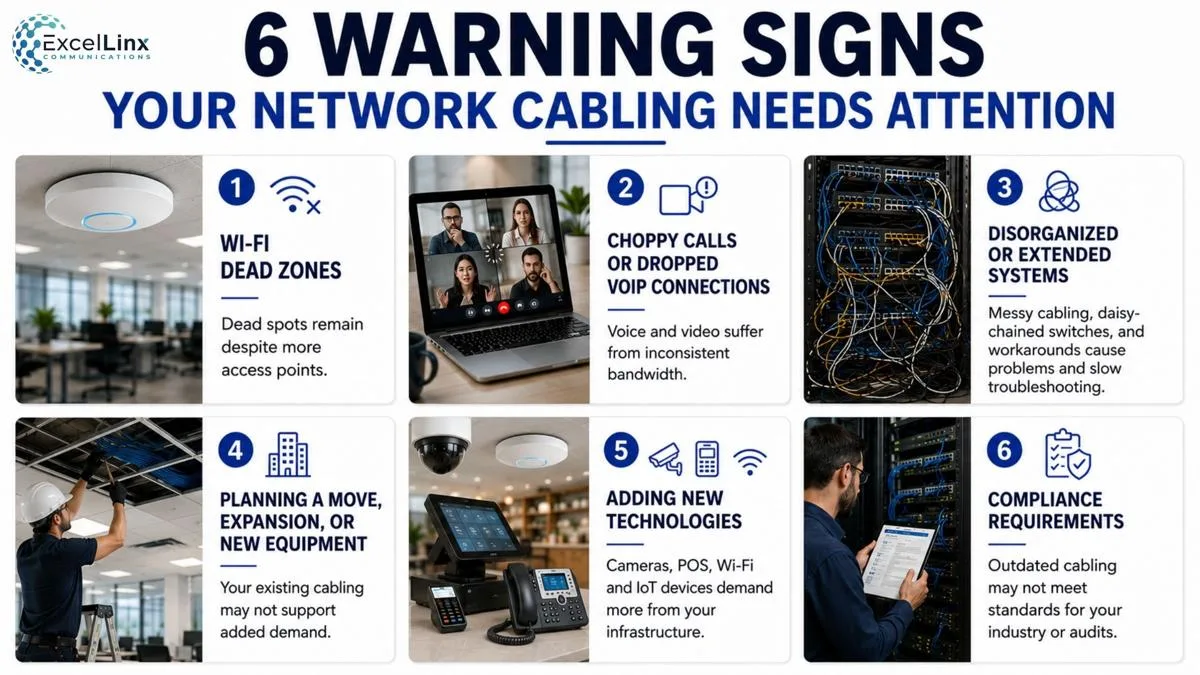
Persistent Wi-Fi dead zones are one of the most common symptoms, especially if you’ve already tried adding more access points without success. The access points themselves might be fine, but if the cabling feeding them can’t deliver enough bandwidth, more hardware won’t fix it.
Choppy video calls or dropped VoIP connections point to the same underlying issue. Voice and video traffic are sensitive to inconsistent bandwidth, and older or degraded cabling is a frequent culprit.
A cabling system that’s grown organically over the years, with patch cables strung across the floor or switches daisy-chained together as a workaround, is another red flag. While this approach may function temporarily, it often creates reliability and troubleshooting challenges over time.
If you’re planning an office move, an expansion, or adding equipment like networked cameras or point-of-sale systems, that’s the right moment to evaluate whether your existing cabling can actually support the added load.
Compliance requirements can also force the issue. Businesses handling card payments, health records, or other regulated data sometimes discover during an audit that their network infrastructure cabling doesn’t meet the standards their compliance framework requires, which turns an upgrade from a nice-to-have into a deadline-driven project.
Check out our blog post for a deeper dive into the signs your business needs a network upgrade.
How Much Does a Structured Cabling Installation Cost?
Structured cabling is typically priced per cable drop rather than as a flat number for the whole building, since every project has a different mix of variables.
Cable Category & Building Type
The type of cable you choose has a significant impact, with Cat6a generally costing more than Cat6 and fiber costing more still. The type of building matters just as much. A retrofit in an older building with limited ceiling access, finished walls, or concrete construction takes more labour than a straightforward run in new construction with open ceilings. Local labour rates and the total number of drops needed also factor into the final number.
The Alternative Costs
It’s also worth weighing the cost of a proper installation against the cost of not having one. A network outage caused by a failing cable run doesn’t just cost the price of a repair call; it costs every hour your team can’t work, take calls, or process transactions while the issue gets tracked down. Viewed that way, a well-documented, standards-compliant system often pays for itself long before it needs its first repair.

The Structured Cabling Installation Process
A structured cabling project generally follows the same sequence regardless of the size of the space, though the timeline scales with the number of drops involved.
It starts with a site assessment, where a technician walks the space, reviews existing infrastructure, and talks through current and future needs. From there, the team designs the cable pathways and drop locations, mapping out where equipment rooms, patch panels, and outlets will go.
Next comes the actual cable run, which involves pulling cable through ceilings, walls, or conduit to reach each planned location. Each cable is then terminated at both ends, connected to a port on a patch panel at one end and a wall jack or faceplate at the other, and labelled according to a consistent naming scheme.
Every run gets tested and certified using a cable certification tool, which checks it against the relevant TIA performance standards.
The project wraps up with documentation, including as-built drawings and the certification report, handed over so your team has a complete record of exactly what was installed and where.
On larger projects, scheduling is often coordinated with other trades working in the same space, such as electricians or general contractors, to avoid conflicts and keep the timeline on track.
Once everything is tested and signed off, it’s also worth registering the installation with the cable manufacturer where applicable, since that step is often what activates the extended warranty coverage mentioned earlier.
The Bottom Line
The most valuable part of structured cabling may be the decisions you don’t have to revisit. Switches, access points, cameras, and phone systems will be replaced several times during a building’s life, but properly planned cabling and pathways can continue supporting those changes. Treat the cabling plan as a long-term property asset, and consider whether today’s design leaves enough capacity for your next department, tenant, or technology upgrade.
Planning an office move, renovation, or network expansion? Reach out to our team and schedule a site assessment to get a clear, standards-based cabling plan built around your space, equipment, and growth plans.
Frequently Asked Structured Cabling Questions
How long does structured cabling installation take?
Structured cabling installation for a single-floor office commonly takes a few days to two weeks. The exact schedule depends on the number of cable drops, pathway complexity, ceiling and wall access, permitted working hours, and whether old cabling must be removed. A site assessment is required to establish a dependable project timeline.
Can structured cabling be installed without disrupting our daily operations?
Yes, structured cabling can usually be installed with limited disruption. Installers may work after hours, complete one department at a time, or prepare new connections before disconnecting the old system. Some drilling, ceiling access, and brief network cutovers may still be necessary, so these activities should be coordinated around your busiest operating periods.
Is Cat6a worth the extra cost for a small office?
Cat6a is worth the additional cost when a small office needs 10 Gbps performance across runs of up to 100 metres, has significant electrical interference, or expects the cabling to outlast several hardware upgrades. For shorter runs serving primarily 1 Gbps devices, Cat6 will generally provide sufficient performance at a lower cost.
Do I need fiber if I’m not running a data center?
You may need fiber optic cabling even if your business does not operate a data centre. Fiber is frequently used for backbone connections between floors, telecom rooms, buildings, or high-bandwidth equipment. Most offices can continue using Cat6 or Cat6a for individual workstations while reserving fiber for longer, higher-capacity connections.
How often should structured cabling be tested or recertified?
Structured cabling does not have a universal routine recertification interval. Every run should be tested and certified when it is installed, then tested again following renovations, cable relocations, physical damage, or unexplained network problems. Keeping the original certification report provides a performance baseline that technicians can use to identify deterioration or installation changes.
What’s the difference between structured cabling and just running network cables?
Structured cabling follows a planned topology that includes defined pathways, patch panels, labelled outlets, consistent termination methods, testing, and documentation. Individual network cables may connect devices successfully, but without this supporting structure, connections become harder to identify, troubleshoot, relocate, and expand as the business adds equipment or reorganizes its space.
What happens if structured cabling isn’t installed to standard?
Cabling that does not meet applicable performance and installation standards can cause intermittent connections, reduced speeds, difficult troubleshooting, failed inspections, and expensive rework. It may also prevent the manufacturer from honouring an extended system warranty. Certification reports, proper cable ratings, and accurate documentation help demonstrate that the installation was completed correctly.