
Key Takeaways:
- Wireless access points connect laptops, phones, scanners, cameras, and other devices to your business network. Strategic deployment ensures those connections remain reliable where people actually work.
- A professional site survey identifies physical obstructions, interference, device requirements, and high-demand areas before access point locations are finalized.
- Busy environments require capacity planning based on the number of simultaneously active devices and the applications they use, rather than floor area alone.
- Effective access point placement accounts for walls, ceilings, mounting orientation, building materials, employee movement, and the capabilities of business-critical devices.
- Switch capacity, cabling, Power over Ethernet, firewalls, and supporting network services must be ready to handle the access points and their combined traffic.
- Centralized management and carefully controlled automation help IT teams detect performance changes, maintain consistent configurations, and troubleshoot problems faster.
- Certificate-based authentication, WPA3, wireless threat monitoring, and practical security testing reduce the risks of stolen credentials, fraudulent networks, and unauthorized access.
Wi-Fi problems can be expensive, even when they appear minor. A frozen video call delays a decision. A disconnected scanner slows an order. An unreliable point-of-sale device frustrates a customer. These failures are often blamed on the internet connection, but the real cause may be how Wi-Fi reaches people inside the building. A thoughtfully planned wireless access point deployment provides a stable foundation for your business, rather than forcing employees to work around unreliable connections.
Site Surveys and Network Planning
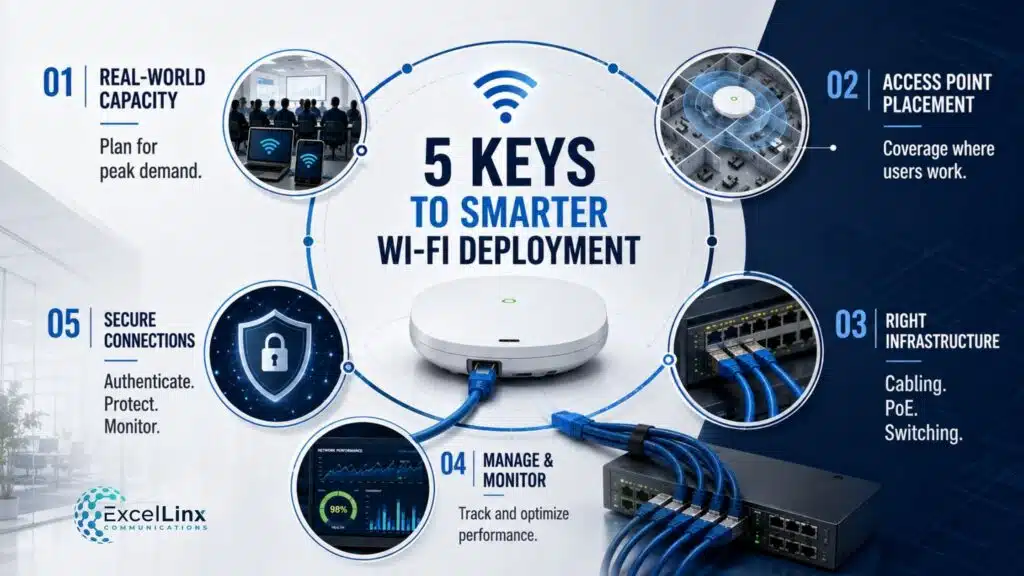
Every strong deployment starts by defining what “good Wi-Fi” means for the organization. Coverage alone is a weak success metric. A warehouse may need dependable roaming for handheld scanners, while an office may prioritize voice calls and dense meeting rooms. A healthcare setting adds mobile equipment and applications that can’t tolerate unpredictable latency. These needs shape the design more accurately than floor area or a generic access-point-per-square-foot formula.
Document Your Technical Requirements
The planning process should document device types, expected client counts, working hours, traffic patterns, mobility, and application sensitivity. Older Internet of Things devices may support only 2.4 GHz, for example, while newer laptops can use 6 GHz. Voice handsets may need carefully controlled cell boundaries to roam without an audible interruption. Understanding that mix helps prevent a design that looks excellent on paper but fails to support critical equipment.
Site Surveys
An on-site RF wireless network survey replaces guesswork with evidence. It considers the number and type of devices, how many people work at the same time, which applications they use, and where demand rises during the day. It also examines the building itself. Concrete walls, low-emissivity glass, metal shelving, machinery, and even stored inventory can weaken or redirect Wi-Fi signals.
Planning typically combines a computer model with testing inside your property. The model provides a sensible starting layout, while on-site measurements expose conditions that a floor plan can’t show, like interference from neighbouring businesses or wireless equipment. The proposed access point models should then be tested in realistic mounting locations.
After installation, a second survey confirms that the finished network performs as designed. This final check catches compromises made during construction before they become recurring support calls.
Performance Optimization in High-Density Environments
Crowded spaces reveal limitations that an internet speed test can miss. Wi-Fi is shared. Devices using the same part of the network take turns sending information, much like team members in a meeting. As more devices try to communicate, everyone can wait longer.
Network planners therefore must consider concurrency, meaning how many people and devices are actively using Wi-Fi at the same time. A 200-person training session could involve 400 connections if everyone carries a laptop and phone. When several attendees start a video or open a cloud application together, performance can drop despite a fast internet service.
Management Traffic
Devices also exchange background traffic to discover the network, maintain connectivity, and roam between access points. This is called management traffic. Although necessary, it uses some available connection time before an employee opens an application. Older devices can complete these exchanges slowly, reducing the time available to others.
Adding access points increases capacity only when each one serves a useful group of devices. Poorly planned access points may compete for airtime and create interference, much like additional conversations in an already noisy room.
A channel is a designated lane for Wi-Fi communication. Wider lanes can give one device a higher peak speed, but leave fewer separate lanes for nearby access points. In a busy office or conference space, narrower channels often provide more consistent service for everyone.
Signal Strength Also Needs Restraint
Configuring every access point to maximum transmit power can cause devices to remain connected to distant access points even when closer alternatives are available. Phones and scanners transmit less strongly than access points, so they may receive a signal they can’t reliably answer. Balanced settings create cleaner coverage and smoother movement.
Performance should be checked during the busiest credible period. Delays, interrupted calls, repeated transmissions, and the distribution of devices among access points reveal whether the network supports real operations, rather than just producing a strong speed test beside the equipment.
Access Point Placement and Coverage Optimization
Convenient installation locations can produce inconvenient Wi-Fi service. Access points are often placed in hallways because cabling is simpler there, while the people who need the connection sit behind office walls and closed doors. Positioning equipment nearer to users reduces the distance and number of obstacles signals have to cross.
Mounting & Placement
Antennas inside each access point shape where its signal travels. A model designed to sit flat on a ceiling may behave differently when mounted vertically. Hiding it above the ceiling can also place ductwork, pipes, insulation, or metal tiles between the signal and users.
Placement must reflect the weakest essential device. An access point may reach farther than a small scanner or a phone can reliably answer it. A planning map can show coverage while applications still stall at the edges.
Different Spaces Need Different Designs
Metal warehouse racks can reflect signals and create weak areas that shift with inventory. A focused antenna may serve an aisle better than a general-purpose ceiling unit. In multi-storey offices, units directly above one another can compete through floors. Outdoor areas must account for foliage, weather, elevation, and protective enclosures.
Users should also be able to move without a call, scanner session, or cloud application dropping. Devices make this transition by leaving one access point and joining another, a process known as roaming. Testing should follow the same routes employees use, including stairwells, loading docks, elevators, and indoor-to-outdoor transitions.
Integration with Your Network Infrastructure
An access point is only the visible end of a larger system. Each unit normally connects by cable to a network switch, which carries its data to company systems and the internet. Many switches also send electrical power through that cable, a feature called Power over Ethernet, or PoE. If an older switch can’t provide enough power or data capacity, a new access point may run with reduced features or become a bottleneck.
Your pre-installation review should cover cable quality, available switch ports, power capacity, connection speeds, and the links carrying combined traffic. Failover planning is equally important. Backup infrastructure provides little protection if it can’t support essential access points when the primary system goes offline.
Data Control
The network then needs rules for different users and devices. Employees often need relevant internal files, guests may need internet service only, and building controls may contact a few approved systems. Virtual networks, commonly called VLANs, and firewall policies separate these groups. This containment prevents a compromised guest device from having a direct path to payroll files or operational equipment.
Supporting services must align with that design. Devices need valid network addresses, identity checks, and permission to reach the correct applications. If one link is misconfigured, a laptop may show a strong Wi-Fi signal but remain unable to work. Spare capacity and accessible cable routes can also prevent a future expansion from becoming a replacement project.
Priority settings must continue through the wired network. Marking a voice or video call as time-sensitive on Wi-Fi achieves little if switches, firewalls, or the internet connection ignore that priority. Consistent treatment reduces audible gaps and frozen images when other users begin large downloads or backups.
Network Management and Automation
Once access points are operating, a central management platform lets the IT team view performance and apply consistent settings across one location or many. Without that common view, small configuration differences can accumulate between sites and make problems harder to diagnose.
Your platform should first establish normal performance, including typical device counts, sign-in time, failed connections, delays, and high-demand areas. Alerts are more useful when they identify a meaningful change. A wave of sign-in failures may indicate an identity-service problem, while repeated transmissions on one floor may point to new interference.
Some platforms automatically change channels or signal strength as conditions shift. These tools need sensible limits. Automation can’t correct equipment installed behind concrete or compensate indefinitely for insufficient capacity. Changes should remain within approved settings so a short-term fix doesn’t create instability elsewhere.
Software Updates & Service Reports
Software updates need a controlled process. An update installed everywhere at once may disrupt specialized scanners or sensors. Testing with a limited group exposes compatibility problems before they affect the business, while a rollback plan provides a safe route back.
Good reporting helps support teams distinguish weak Wi-Fi from a failed login service, overloaded internet connection, damaged cable, or device problem. Faster diagnosis reduces downtime and prevents unnecessary hardware purchases.
A dashboard should connect technical measurements to business symptoms. Showing which users, locations, or applications are affected helps IT prioritize the problem causing the greatest operational cost instead of chasing every alert.
Regulatory Compliance and Specialized Deployments
Wi-Fi equipment must operate within the rules of the country where it’s installed. In Canada, Innovation, Science and Economic Development Canada, or ISED, sets requirements for approved equipment, frequencies, and power levels. Hardware imported from another market or configured for another country may use settings that aren’t permitted locally.
The newer 6 GHz Wi-Fi band requires particular care because equipment classes have different operating conditions. Canada’s RSS-248 standard requires standard-power access points to obtain authorization from an approved automated frequency coordination system before transmitting. The system checks whether proposed settings could interfere with licensed services. Compatible equipment must still be configured and installed for its approved use.
Certain 5 GHz channels can also be shared with protected radar systems. Access points using those channels must detect radar activity and move when required. That change can briefly affect devices that are sensitive to interruptions, so the design should account for the applications being supported.
Your Property May Need Added Requirements
Outdoor installations need suitable weather protection, grounding, and surge protection. Hospitals may impose infection-control procedures and strict continuity requirements. Industrial sites may need rugged equipment around dust, vibration, motors, or hazardous areas. Cable routes through fire-rated building spaces must use appropriate materials and installation methods. Addressing these details during planning avoids compliance issues and expensive rework later.

Security Measures in Access Point Deployment
Wireless signals can extend into parking lots, neighbouring suites, and other areas the business does not control. The greater risk, however, is not simply that someone can detect the network. An attacker may imitate its name, trick employees into connecting, or reuse a stolen password from anywhere within range. Deployment planning must therefore address how devices confirm that a network is genuine and how the network verifies each connection.
For businesses with managed devices, certificate-based authentication provides stronger control than a password shared among employees. A certificate is a digital identity installed on an approved device. It can be revoked when the device is lost or an employee leaves, without forcing everyone else to reconnect with a new password. Devices should also be configured to verify the authentication server’s certificate. Otherwise, a convincing fake access point could capture login details by posing as the company network.
WPA3 should be enabled wherever devices support it. Protected Management Frames can add another safeguard by preventing forged commands that attempt to disconnect devices from their access points. Compatibility testing remains important because older scanners, sensors, and other specialized equipment may not support these protections. Those limitations should be documented and accommodated separately rather than allowed to determine the security settings for every employee device.
Detecting Unauthorized Wireless Activity
A deployment must also watch for unauthorized wireless equipment. An employee might connect a personal hotspot to bypass restrictions, while an incorrectly installed access point could expose the internal network. More serious threats include an attacker creating a network with a familiar name to attract automatic connections. Wireless monitoring can identify these signals, but alerts should specify who investigates them and how quickly. Detection offers limited protection if alerts are not reviewed and investigated appropriately.
Protecting and Testing Wireless Security Controls
Centralized control creates its own concentration of risk. Someone who compromises the wireless management platform may be able to change security settings across every location at once. Administrative access should therefore use phishing-resistant multifactor authentication where available, separate routine monitoring permissions from configuration privileges, and record changes in logs that administrators cannot quietly erase. Emergency accounts should be tightly controlled and tested before an outage makes them necessary.
Security validation should reproduce events the business will eventually face. Test whether a dismissed employee loses access promptly, a lost device certificate can be revoked, and devices reject a fraudulent network using the company’s name. Certificate expiry, failed authentication services, software updates, and backup-system activation should also be tested. These exercises uncover weaknesses in the full connection process that a configuration review alone may miss.
Final Thoughts
A well-designed wireless network should make growth easier, not turn every new device or workspace into another troubleshooting project. The most valuable investment is a wireless infrastructure that can be monitored, optimized, and secured as your business evolves. If unreliable Wi-Fi is disrupting productivity or limiting your plans, reach out to our team at ExcelLinx to assess your environment and build an access point deployment around the way your business actually operates.
Frequently Asked Wireless Access Point Questions
What is wireless access point deployment?
Wireless access point deployment is the process of planning, installing, configuring, and testing the devices that provide Wi-Fi throughout a business property. A strategic deployment considers coverage, user demand, building materials, device types, security requirements, and existing network infrastructure to create a reliable wireless environment.
How many wireless access points does a business need?
The right number depends on the property layout, construction materials, connected devices, applications, and peak usage. A square-footage formula cannot account for concrete walls, crowded meeting rooms, warehouse shelving, or mobile scanners. A wireless site survey provides a more accurate recommendation based on measurable coverage and capacity requirements.
Why is a wireless site survey important before installation?
A wireless site survey reveals signal obstructions, interference, high-demand areas, and the best mounting locations for access points. It helps prevent dead zones, overloaded equipment, and unnecessary installations. Testing after deployment then confirms that employees and business devices receive reliable service under realistic operating conditions.
Where should wireless access points be installed?
Access points should be positioned near the people and devices they serve, with as few physical obstructions as practical. Effective placement considers walls, doors, ceilings, metal structures, equipment orientation, and employee travel routes. Hallways or above-ceiling spaces may be convenient for cabling but can produce weaker coverage inside work areas.
How can access point deployment improve Wi-Fi security?
A secure deployment can use device certificates, WPA3, Protected Management Frames, and monitoring for unauthorized or fraudulent networks. These measures help verify legitimate connections, protect credentials, and identify suspicious wireless activity. Security testing should also confirm that revoked accounts, lost devices, and fake networks are handled correctly.
How does strategic access point deployment support business growth?
A scalable deployment includes sufficient switch capacity, cabling, electrical power, network addresses, and management capabilities for future devices and workspaces. This preparation allows your business to expand coverage or capacity without redesigning the entire network, helping control upgrade costs while preserving reliable Wi-Fi performance.